HONG KONG, August 06, 2026 /24-7PressRelease/ — Organizations across marketing, education, and training departments maintain large libraries of PDF documents that rarely reach audiences who prefer video over reading. Recastia, an AI-powered content repurposing platform, has introduced a PDF to video converter that generates watchable clips directly from existing files. The tool targets teams that need to distribute information in video format but lack the time or resources to rebuild content inside a dedicated video editor.
The conversion process begins when users select the PDF to Video option in their browser and upload a source document. The platform analyzes each page of the document, composes a spoken narrative from the source material, and assembles the final clip with AI-synthesized narration, on-screen text timed to the audio, an accompanying soundtrack, and animated transitions between sections. An optional AI avatar presenter can narrate the PDF to video converter output on screen, giving the clip a guided, presenter-led format suited to training walkthroughs and product explanations.
The PDF to video converter offers three generation modes to match different presentation needs. Minimal Mode produces an auto page carousel without voiceover or narration, suited to social feeds and lobby screens where viewers watch without sound. Easy Mode pairs AI-powered voiceovers and avatars with smart page sync, delivering a narrated clip that follows the document flow automatically. Advanced Mode provides page-by-page reading with AI voice narration and avatars, giving creators finer control over how each section is presented and paced in the final output.
Once the PDF to video converter finishes generating a clip, users publish it online and distribute it through a single shareable link or QR code. Recipients open the video directly in a browser without downloading files or installing software. This link-based distribution model replaces email attachments and large file transfers, making it practical to share pitch decks, catalogs, training manuals, and reports as video with internal teams or external audiences.
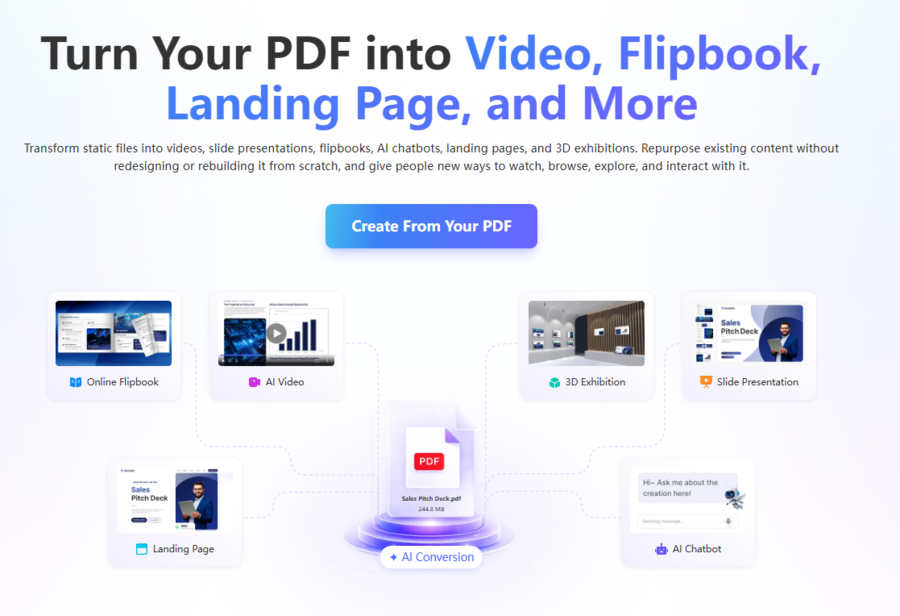
A single upload to the PDF to video converter also unlocks additional formats within the same workspace. Teams that need a browsable catalog can publish a flipbook; those preparing a guided walkthrough can generate a slide presentation with spoken narration; and departments looking to surface answers without manual search can deploy a chatbot grounded in the document’s content. Landing pages and 3D exhibition spaces round out the available outputs. Because every format draws on the original file, the PDF to video converter serves as one entry point into a broader repurposing workflow rather than a standalone conversion step.
“The PDF to video converter handles the production steps that typically sit between a finished document and a shareable clip. Teams upload what they already have and receive a narrated video without coordinating scripts, voiceover talent, or editing timelines,” said Winston Zhang, CEO of Recastia.
To learn more about how the PDF to video converter works, please visit Recastia.
About Recastia
Recastia Co., Ltd. builds an AI-driven content repurposing platform that converts static documents into audience-ready formats. The platform serves marketing, sales, education, and training teams by generating video, flipbooks, presentations, landing pages, chatbots, and 3D exhibitions from a single uploaded file, allowing organizations to extend the reach of existing materials without rebuilding them for each channel.
—
For the original version of this press release, please visit 24-7PressRelease.com here
Legal Disclaimer: The content on this page is syndicated from independent third-party providers. Kyrion Media makes no warranties or representations regarding the accuracy, completeness, legality, or reliability of the information, including text, images, videos, or licenses. If you are affiliated with this content or have any complaints, copyright concerns, or requests for removal, please contact us at retract@kyrionmedia.com with the specific URL of the content in question. We will review and address valid requests promptly.